Table of Contents
Introduction
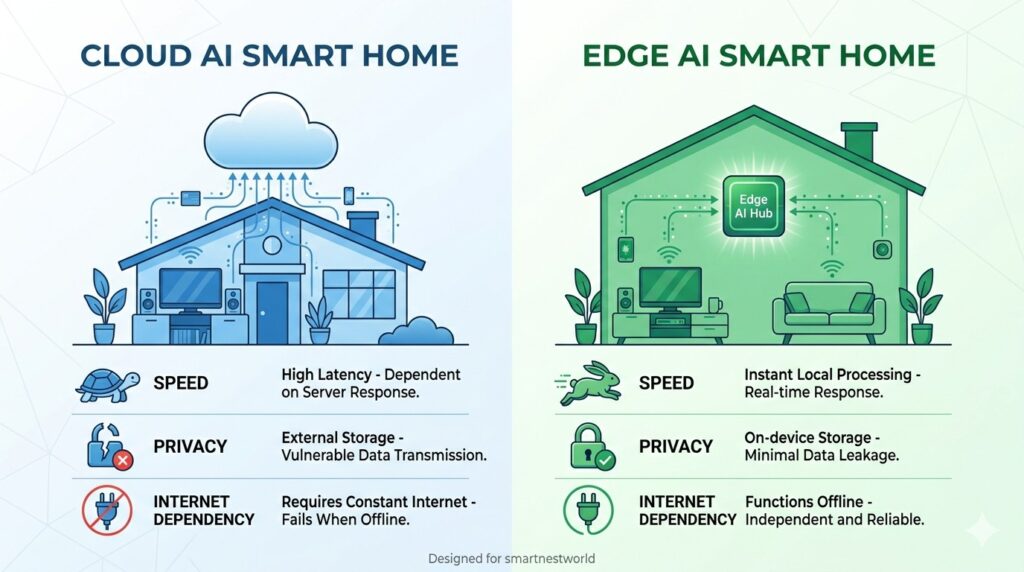
You’ve probably heard the term “smart home” and even “artificial intelligence house.” But there’s a hidden battle taking place inside your walls: the clash between cloud AI and edge AI. The difference determines how fast, private, and reliable your home automation becomes.
An edge AI smart home processes data locally – on the device itself or on a hub inside your house – rather than sending everything to remote servers. In 2026, edge AI has matured to the point where it outperforms cloud‑dependent systems in speed, privacy, offline operation, and even energy efficiency.
In this guide, you’ll learn:
What edge AI and cloud AI are (and why it matters for your home)
The critical advantages of edge AI for smart homes
Real‑world applications: cameras, voice assistants, sensors
How to build your own edge AI smart home today
Future trends that will make cloud‑only systems obsolete
If you care about privacy, instant response times, and a smart home that works even when the internet goes down, read on.
What Is an Edge AI Smart Home? (And How It Differs from Cloud AI)
Let’s start with clear definitions.
Cloud AI Smart Home
In a cloud‑based system, your smart devices collect data (e.g., video from a camera, voice command, temperature reading) and send it to a remote server. The server processes the data using large AI models, then sends back a command.
Examples: Most Alexa routines, Google Nest cameras (without local processing), early SmartThings cloud automations.
Edge AI Smart Home
An edge AI smart home performs AI processing on the device itself or on a local hub (like Home Assistant with an AI accelerator, or a camera with an onboard neural processing unit). Data never leaves your home unless you explicitly allow it.
Examples: Unifi AI cameras, Home Assistant with local LLM, Aqara FP2 occupancy sensor, Apple HomeKit (for many features).
| Aspect | Cloud AI | Edge AI |
|---|---|---|
| Response time | 200–500 ms (plus internet latency) | 10–50 ms |
| Internet required | Yes, for most functions | No (works offline) |
| Privacy | Data sent to third‑party servers | Data stays local |
| Monthly fees | Often required for advanced AI | No recurring fees |
| Scalability | Limited by bandwidth and cloud costs | Scales with local hardware |
| Update dependency | Features change via cloud (can be removed) | You control updates |
Why an Edge AI Smart Home Is Critical in 2026
Several trends have pushed edge AI from a niche hobbyist option to a mainstream necessity.
1. Privacy Regulations & User Awareness
With GDPR, CCPA, and emerging AI‑specific laws, homeowners are realizing that cloud cameras send footage to unknown servers. An edge AI smart home keeps sensitive data – like who is in your house, when you sleep, and your daily routines – completely local.
2. Internet Reliability
Even the best fiber connections can go down. When that happens, cloud‑dependent smart homes become “dumb.” Edge AI systems continue to run automations: lights still turn on at sunset, security cameras still record and detect motion, and your thermostat still adjusts based on local sensors.
3. Latency‑Sensitive Applications
Voice assistants with cloud AI have a noticeable delay. Edge AI allows near‑instant responses. For safety‑critical tasks (e.g., shutting off a stove when no motion is detected), milliseconds matter.
4. Bandwidth & Cost Savings
A single 4K security camera streaming 24/7 to the cloud can use terabytes of bandwidth per month. Edge AI processes video locally and only sends short clips when an event occurs – or none at all.
Core Technologies Enabling Edge AI Smart Homes
To build an edge AI smart home, you need hardware and software that can run machine learning models without cloud assistance.
Neural Processing Units (NPUs)
Modern smart home devices now include dedicated NPUs – chips designed to run AI models efficiently. Examples:
Google Coral (USB accelerator for Home Assistant)
Apple Neural Engine (in HomePod and Apple TV)
NVIDIA Jetson (for advanced DIY systems)
Local Large Language Models (LLMs)
Instead of relying on ChatGPT or Alexa’s cloud, you can run smaller LLMs on a local hub. Models like Ollama with Llama 3 or Mistral can understand natural language commands like “Make the living room cozy” and execute automations – all offline.
TinyML on Sensors
Small sensors (motion, air quality, sound) now have enough processing power to run basic AI models. For example, an mmWave radar sensor can detect not just motion but also breathing rate and fall events without sending raw data anywhere.
Local Automation Engines
Home Assistant with the “Local AI” add‑on
Hubitat with webCoRE
Node‑RED for visual rule building
Real‑World Applications: Edge AI in Action
Let’s look at specific devices and scenarios that make an edge AI smart home superior.
1. AI Cameras Without the Cloud
Traditional “smart” cameras like Ring or Google Nest require a subscription and send footage to the cloud. Edge AI alternatives:
Unifi Protect cameras (G4 Pro, AI Pro) – person, vehicle, and face detection on‑device. No subscription. All footage stored locally on your own Network Video Recorder (NVR).
Frigate (open‑source) – runs on a local server with a Google Coral accelerator. It can detect objects, animals, and even specific faces without ever touching the internet.
Automation example: When Frigate detects a delivery person at the front door, it sends a snapshot to your phone via a local notification. No cloud involved.
2. Voice Assistants That Work Offline
Amazon and Google are slowly adding local processing, but open‑source solutions lead the way:
Rhasspy – completely offline voice assistant that integrates with Home Assistant.
Home Assistant’s Assist – with a local LLM, you can ask, “Turn off all lights downstairs,” and the processing never leaves your network.
Why it matters: No one listens to your conversations. No internet = no problem.
3. Predictive Presence Without Privacy Risks
Cloud‑based presence detection uses your phone’s location (which is shared with Apple/Google). Edge AI alternatives:
Aqara FP2 – mmWave radar sensor that detects occupancy, location within a room, and even fall events. All processing happens on the sensor; it only sends “occupied” or “vacant” signals to your hub.
Bermuda (Home Assistant integration) – uses Bluetooth trilateration to track phones with 0.5‑meter accuracy, all local.
Automation example: When you enter the kitchen, the under‑cabinet lights turn on. When you leave, they turn off after 2 minutes – no cloud, no delay.
4. Energy Management with Local Intelligence
Instead of sending your energy data to a utility company, edge AI can learn your patterns locally. Tools like Predbat (Home Assistant add‑on) predict solar generation and battery usage using local weather models and historical data – all processed on your hub.
How to Build Your Own Edge AI Smart Home (Step by Step)
You don’t need to be a programmer. Follow these steps to transition from cloud‑dependent to an edge AI smart home.
Step 1: Choose a Local Hub
The brain of your system must run locally. Best options:
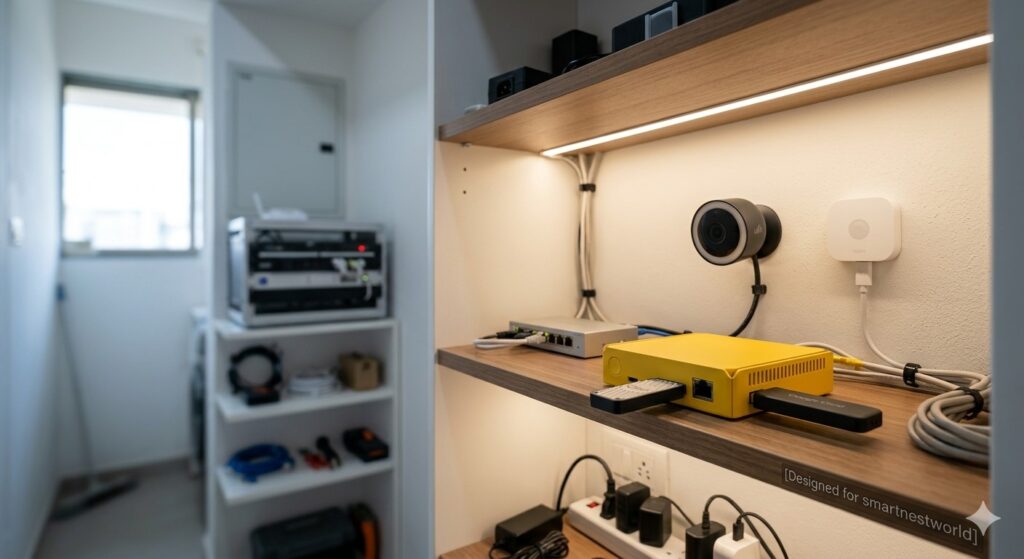
Home Assistant Green ($99) – plug‑and‑play, supports thousands of integrations.
Home Assistant Yellow (with Raspberry Pi CM4) – includes built‑in Thread/Zigbee radio.
Hubitat Elevation – fully local rule engine, less flexible than Home Assistant but simpler.
Avoid hubs that require cloud accounts for basic functionality (e.g., early SmartThings, Tuya).
Step 2: Add an AI Accelerator (Optional but Recommended)
For real‑time object detection or local LLMs, add a Google Coral USB Accelerator ($60). Plug it into your Home Assistant device. It speeds up AI inference by 10‑100x.
Step 3: Replace Cloud Cameras with Edge AI Cameras
Sell your Ring/Nest cameras and install:
Unifi G4 Instant (wired or Wi‑Fi) – requires a Unifi Console (e.g., Cloud Key Gen2 or Dream Machine).
Amcrest or Reolink cameras + Frigate add‑on in Home Assistant.
Configure Frigate to detect people, cars, and animals. Set up automations like “If person detected in backyard after midnight, turn on floodlight and play dog barking sound.”
Step 4: Install a Local Voice Assistant
Add the Rhasspy or Wyoming integration to Home Assistant.
Use a cheap USB microphone (e.g., ReSpeaker 2‑Mic) on a Raspberry Pi or run it on your main hub.
Train wake words offline (e.g., “Hey Jarvis”).
Step 5: Migrate Automations from Cloud to Local
Rewrite any cloud‑dependent routines (e.g., IFTTT, Alexa Routines) as local scripts in Home Assistant.
Use Node‑RED for complex logic without coding.
Step 6: Set Up Local Notifications
Instead of using cloud push services (which can be delayed), use a local notification system:
Home Assistant Companion App (supports local push via your own server).
Ntfy.sh (self‑hosted) for reliable alerts.
Top Devices for an Edge AI Smart Home (2026)
| Category | Recommended Product | AI Features | Local Processing |
|---|---|---|---|
| Hub | Home Assistant Green + Coral | LLM, object detection, predictive models | ✅ Full |
| Camera | Unifi AI Pro | Face recognition, vehicle detection | ✅ On‑camera |
| Voice | Home Assistant Assist + USB mic | Natural language commands | ✅ (with local LLM) |
| Occupancy | Aqara FP2 (mmWave) | Fall detection, position tracking | ✅ On‑sensor |
| Smart Plug | Athom (pre‑flashed with ESPHome) | Energy monitoring (local) | ✅ |
| Thermostat | Ecobee (with HomeKit mode) | Learning schedule (local after setup) | ⚠️ Partial |
| Lighting | Philips Hue + Zigbee (no bridge internet) | Adaptive lighting (local) | ✅ |
Privacy & Security: The Edge AI Advantage
An edge AI smart home inherently offers better privacy because data never leaves your network. But you still need to follow best practices:
Isolate IoT devices on a separate VLAN (virtual local area network) that cannot reach the internet except for necessary updates.
Use strong encryption – WPA3 for Wi‑Fi, and ensure Zigbee/Z‑Wave use their built‑in AES.
Regularly update your hub and device firmware – but do so manually or via local repository.
Audit network traffic with a firewall like pfSense or OPNsense to confirm no data is leaking to the cloud.
Can an Edge AI Smart Home Be 100% Cloud‑Free?
Yes, with careful device selection. Choose devices that support Matter over Thread (which is local by design) and avoid brands that require cloud accounts (e.g., Tuya, most cheap Wi‑Fi bulbs). Open‑source firmware like ESPHome or Tasmota can liberate many devices.
The Future: Why Cloud‑Only Smart Homes Will Fade
By 2028, industry analysts predict that over 60% of new smart home devices will have edge AI capabilities. Several forces are driving this:
Cost of cloud compute – Running AI models in the cloud is expensive; manufacturers are shifting costs to consumers via subscriptions. Edge AI eliminates those fees.
Regulatory pressure – Laws like the EU’s AI Act restrict sensitive data from leaving the home without explicit consent.
Consumer demand – High‑profile cloud breaches have made people wary. Edge AI offers a tangible privacy upgrade.
Even giants like Amazon and Google are adding more local processing: the latest Echo devices can handle some voice commands offline, and Google’s Nest cameras now have on‑device face detection (but still require cloud for most features). However, open‑source and pro‑sumer solutions already exceed what big tech offers.
Common Myths About Edge AI Smart Homes
| Myth | Reality |
|---|---|
| Edge AI is less accurate than cloud AI. | Modern tinyML models match cloud accuracy for most home tasks (e.g., person detection). Specialized models (like face recognition) can be trained locally and become more accurate over time. |
| You need to be a programmer. | Home Assistant and Hubitat have user‑friendly interfaces. You can set up basic edge AI without writing code. Advanced features (like custom LLMs) require some technical skill, but pre‑built add‑ons exist. |
| Edge AI can’t learn as well. | Edge systems can still learn from local data – they just don’t send that data to the cloud. Machine learning models can be updated via local downloads. |
| It’s more expensive. | Initial hardware costs (e.g., Coral accelerator, good cameras) can be higher, but you save on monthly subscriptions and cloud fees. Over 2‑3 years, edge AI is often cheaper. |
Visit Previous Article:- smart home design Ideas
Visit Good Products:- Google Homes
Conclusion
The edge AI smart home is not a futuristic concept – it’s a practical, available‑now upgrade that delivers faster responses, complete privacy, offline operation, and lower long‑term costs. While cloud AI will continue to have a place for some applications (like large‑scale data analysis), the core intelligence of your home should be local.
In 2026, building an edge AI smart home is easier than ever. With platforms like Home Assistant, affordable hardware like the Google Coral, and a growing ecosystem of local‑first devices, you can take control of your home’s intelligence – without giving away your data.
Start small: replace one cloud camera, set up a local voice assistant, or migrate a simple automation. Once you experience the speed and reliability of edge AI, you’ll never want to go back to the cloud.
Frequently Asked Questions (FAQ)
What is an edge AI smart home?
An edge AI smart home processes artificial intelligence tasks locally on devices or a hub inside your home, rather than sending data to remote cloud servers. This improves speed, privacy, and offline reliability.
Do I need an internet connection for an edge AI smart home?
No. Edge AI systems work entirely offline for core functions (automation, camera detection, voice control). You may still want internet for firmware updates or remote access (which you can optionally secure via VPN).
Can I convert my existing cloud‑based smart home to edge AI?
Yes, gradually. Start by replacing your hub with Home Assistant (it can often control your existing devices). Then replace cameras and voice assistants one by one. Many Wi‑Fi bulbs and plugs can be reflashed with local firmware.
Is edge AI more secure?
Generally, yes. Since data never leaves your network, the attack surface is much smaller. However, you must still secure your local network (strong passwords, VLANs, updates).
What is the best edge AI smart home hub in 2026?
Home Assistant (running on a Green or Yellow device) is the most powerful and flexible. For a simpler, still local option, Hubitat Elevation is a good choice.