Table of Contents
Introduction
You’ve invested in smart lights, a voice assistant, security cameras, and an intelligent thermostat. Your home is convenient, energy‑efficient, and futuristic. But there’s a question every smart home owner must ask: How secure is it from hackers?
Smart homes are vulnerable. A single compromised device can give attackers access to your network, your personal data, or even your physical security. In 2026, with the rise of AI‑powered attacks and millions of unsecured IoT devices, the threat is real.
If you’ve ever typed into Google, “how to secure my smart home from hackers” – this guide is for you. You don’t need to be a cybersecurity expert. Follow these 10 proven steps, and you’ll dramatically reduce your risk.
Why Smart Homes Are Prime Targets for Hackers
Before we dive into solutions, understand the problem. Hackers love smart homes for three reasons:
Weak default security – Many smart devices ship with easy‑to‑guess passwords and unencrypted communications.
Large attack surface – A typical smart home has 15‑20 connected devices (cameras, plugs, locks, speakers, hubs). Each is a potential entry point.
Valuable data – Your daily routines, camera feeds, and voice recordings are worth money on the dark web.
Attackers can turn your smart home against you: unlocking doors, disabling alarms, spying through cameras, or using your devices in a botnet to attack others.
The good news: with a few hours of work, you can lock down your smart home completely.
Step 1: Change Default Passwords – Immediately
The number one mistake is leaving default usernames and passwords (e.g., “admin/admin” or “1234”). Hackers have automated scripts that scan for these.
What to do:
For every smart device (router, hub, camera, plug), log in and change the password to a strong, unique one.
Use a password manager (e.g., Bitwarden, 1Password) to generate and store 16‑character random passwords.
If the device supports it, change the default username as well.
Pro tip: Never reuse passwords across devices. If one device is compromised, others remain safe.
Step 2: Enable Two‑Factor Authentication (2FA)
Two‑factor authentication adds a second layer of protection. Even if a hacker steals your password, they cannot log in without the second factor (usually a code from an authenticator app or SMS).
Where to enable 2FA:
Your smart home hub’s cloud account (SmartThings, Home Assistant Cloud, Alexa app, etc.)
Any smart device that has a web or mobile account (Ring, Nest, Philips Hue, etc.)
Your router’s admin interface (if accessible remotely)
Recommendation: Use an authenticator app like Google Authenticator or Authy instead of SMS, which can be intercepted.
Step 3: Segment Your Network – Create an IoT VLAN
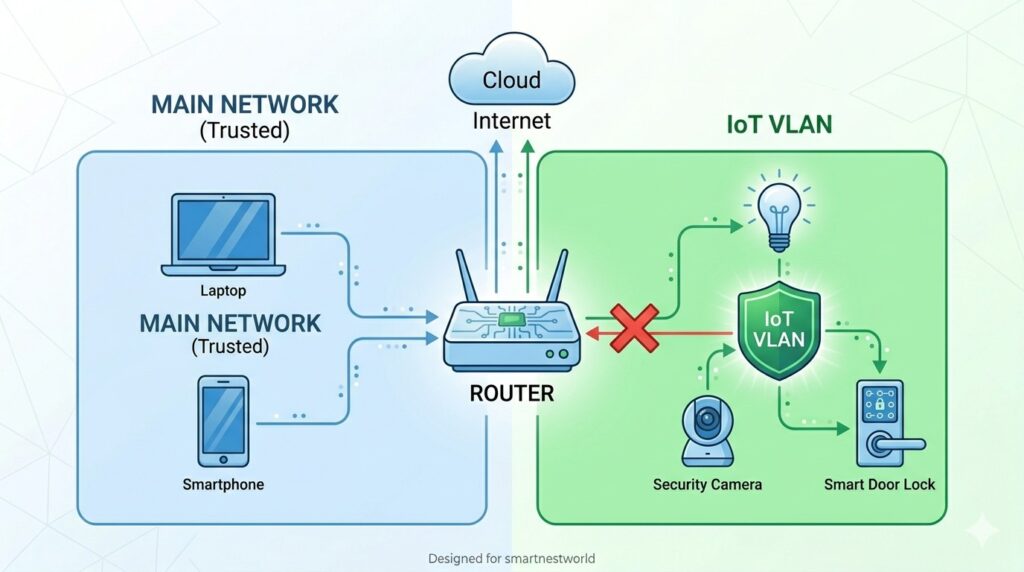
Your main computer and phone hold sensitive data (banking, emails, personal photos). Smart devices are less secure. If they share the same network, a hacked camera can jump to your laptop.
Solution: Network segmentation
VLAN (Virtual Local Area Network) – Isolate all smart home devices onto a separate network.
Most modern routers (Unifi, TP‑Link Omada, Asus) support VLANs or guest networks with device isolation.
Configure the IoT VLAN to have no access to your main LAN. Devices can only talk to the internet (if needed) or your hub.
Beginner alternative: Use your router’s guest network for all IoT devices. Disable “guest network access to local network” in settings.
Step 4: Keep Firmware and Apps Updated
Hackers exploit known vulnerabilities. Manufacturers release patches – but only if you install them.
Best practices:
Enable automatic updates on your router, hub, and smart devices where possible.
For devices without auto‑updates, set a monthly calendar reminder to check for firmware updates.
Update the mobile apps you use to control your smart home.
Critical: Many cheap smart devices stop receiving updates after a year. Consider replacing them with brands that have a track record of security support.
Step 5: Disable Unnecessary Features
Every extra feature (remote access, UPnP, cloud recording, voice control) is a potential attack surface.
What to disable:
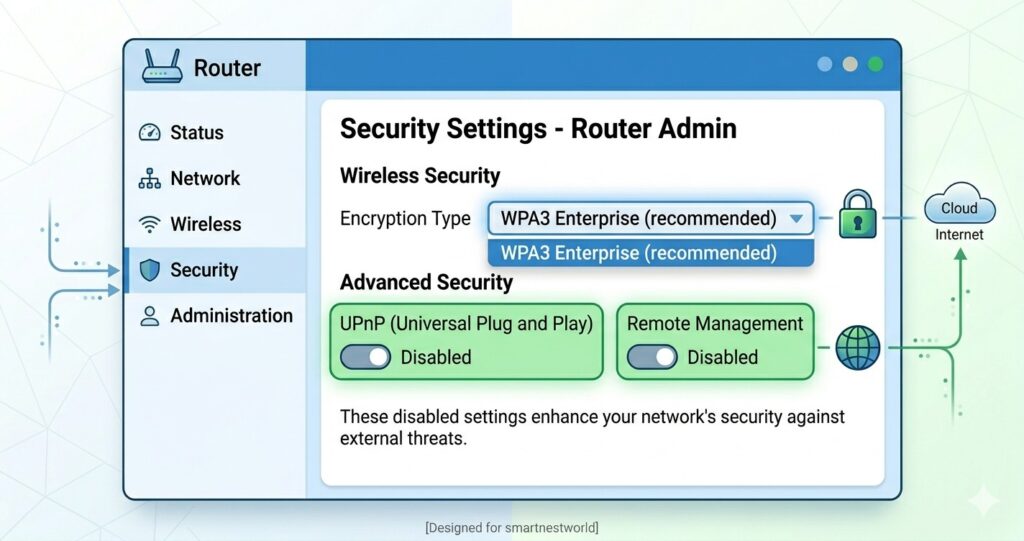
UPnP (Universal Plug and Play) on your router – it allows devices to open inbound ports automatically, a major security risk.
Remote access – If you don’t need to control your home from outside, turn it off. If you do, use a VPN instead of vendor’s cloud.
Cloud recording for cameras – Use local storage (microSD, NVR) instead of sending footage to a third‑party server.
Microphone on smart speakers or cameras if not needed.
Step 6: Use Strong Encryption (WPA3 on Wi‑Fi)
Your Wi‑Fi is the gateway. If it’s weak, attackers can eavesdrop on all traffic.
Settings to apply:
Use WPA3 encryption (the latest standard). If your router doesn’t support WPA3, use WPA2‑AES – never WEP or WPA‑TKIP.
Disable WPS (Wi‑Fi Protected Setup) – it has known brute‑force vulnerabilities.
Change your Wi‑Fi SSID to something that doesn’t identify you (e.g., “HappyPanda” instead of “SmithFamilyHome”).
Bonus: Create a separate Wi‑Fi SSID for your IoT VLAN with its own password.
Step 7: Monitor Network Traffic for Anomalies
Even with all precautions, a device might get compromised. Active monitoring helps you catch it early.
Tools for home users:
Pi‑hole – blocks malicious domains and shows which devices are phoning home unexpectedly.
Fing – scans your network and alerts you when unknown devices connect.
Unifi Network (if you use Unifi gear) – provides traffic insights and threat detection.
What to look for: A smart plug sending gigabytes of data to a server in Russia, or a camera trying to connect to an unknown IP at 3 AM. That’s a red flag.
Step 8: Buy from Trusted Brands – Avoid No‑Name Devices
Cheap, no‑name smart devices from unknown manufacturers often have backdoors, unpatched vulnerabilities, or intentionally malicious firmware.
Safe brands (as of 2026):
Hubs: Home Assistant (open‑source), Hubitat, Apple, Samsung SmartThings
Cameras: Unifi, Arlo, Eufy (with local storage), Google Nest (if you accept cloud trade‑offs)
Plugs & bulbs: Philips Hue, TP‑Link Kasa (with local mode), IKEA Trådfri, Aqara
Locks: Yale, August, Schlage (Z‑Wave or Matter versions)
Rule of thumb: If a device requires a sketchy app from an unknown developer and asks for excessive permissions (like access to your contacts), avoid it.
Step 9: Secure Your Router – The First Line of Defense
Your router is the front door. If it’s compromised, everything behind it is at risk.
Router security checklist:
Change the default admin password (step 1).
Disable remote management (access to router settings from the internet).
Turn off UPnP (step 5).
Enable the router’s built‑in firewall.
Update the router’s firmware (step 4).
Consider a firewall appliance like pfSense or Firewalla for advanced protection.
Step 10: Create a Separate Email for Smart Home Accounts
If your primary email is compromised, attackers can request password resets for your smart home accounts.
Simple but effective:
Create a dedicated email address (e.g., smarthome@yourdomain.com) only for your smart home accounts.
Use a strong, unique password for that email.
Never use this email for shopping, banking, or social media.
This way, even if another site leaks your main email, your smart home remains isolated.
Bonus: What to Do If You Think Your Smart Home Is Hacked
If you notice strange behavior (lights turning on by themselves, camera moving without command, unknown devices on your network):
Disconnect your hub from the internet immediately.
Change all passwords – Wi‑Fi, router admin, hub account, and device accounts.
Reset compromised devices to factory settings and update firmware before reconnecting.
Scan your network with Fing or Wireshark to identify unknown devices.
Consider professional help – a local IT security expert can audit your setup.
Visit Previous Post:- Smart Home Design Ideas
Visit relevant Products:- Google Home
Conclusion
Asking “how to secure my smart home from hackers” is the first responsible step. The second is taking action. You don’t need to implement all 10 steps in one weekend. Start with the easiest: change default passwords, enable 2FA, and update your router’s firmware.
In 2026, the tools and knowledge to protect your digital home are available to everyone. By following this guide, you’ll sleep better knowing your smart home is a fortress – not an open door.
For more advanced protection, check out our guide: [Edge AI Smart Home: Why Local Processing Beats the Cloud] (internal link). And if you’re concerned about privacy, read [Smart Home Data Privacy: How to Build a Zero‑Trust AI Home]
Frequently Asked Questions (FAQ)
Can a smart home be hacked without internet access?
Yes, if an attacker gains physical access (e.g., a visitor or a malicious device plugged into a USB port). However, most remote hacks require internet. For maximum security, isolate your smart home from the internet entirely – but you’ll lose remote control.
Are voice assistants like Alexa security risks?
They can be. Voice recordings are stored in the cloud (unless you use a local‑only assistant). Disable features like “voice purchasing” and review your voice history regularly. Consider open‑source local assistants (Rhasspy, Home Assistant Assist) for better privacy.
Is Z‑Wave or Zigbee more secure than Wi‑Fi?
Both Z‑Wave and Zigbee use AES‑128 encryption and are generally more secure than generic Wi‑Fi devices because they are not directly exposed to the internet. However, the hub that bridges them to your network must still be secured.
Do I need a firewall for my smart home?
Most routers have a basic firewall. For advanced protection, a dedicated firewall (like Firewalla or pfSense) can block outbound connections from compromised devices and provide intrusion detection.
What is the most common way smart homes get hacked?
Weak or default passwords, followed by unpatched firmware. The Mirai botnet (2016) infected hundreds of thousands of devices using default credentials – and similar attacks still happen daily.